

3 Office Cable Management Components Facilities Teams Should Specify
For most offices, the right combination is an under-desk ventilated tray, an articulated cable spine and a desk grommet with in-desk power. Alxr’s Vertical Cable Manager, Under Desk Power Module and Under Desk Linking Mechanism cover all three. A quick tidy costs little more than a tray and some Velcro; a proper multi-desk install with power modules and linking hardware is where the budget and the payoff both grow.
TL;DR:
- Proper cable management requires measuring all cables and adapters, especially power bricks, to select appropriately sized trays and spines for safety and capacity.
- Ventilated metal trays are essential for setups with heat-generating adapters, and social distancing height-adjustable desks necessitate an articulated spine with sufficient slack to prevent cable damage.
- Using screw-mounted trays and cable-routing hardware ensures stability and longevity, while labels help quickly identify cables during maintenance or reconfiguration.
- Shared office spaces benefit from standardizing cable management components, labeling everything clearly, and centralizing power to reduce clutter and maintenance time.
- DIY installation suffices for single desks with light loads, but professional setup is recommended for multi-desk rollouts to ensure proper wiring, ventilation, and warranty compliance.
Table of Contents
- What are the main types of cable management for office desks?
- How do you choose the right cable management for your office?
- Sit–stand desks: where cable management usually fails
- How do you install and maintain office cable management?
- Why choose Alxr for office cable management?
- How do you manage cables in shared or multi-user offices?
- What are the most common cable management mistakes?
- A procurement view: what’s worth the extra spend
- Order office cable management products from Alxr
- Sources
What are the main types of cable management for office desks?
Most office cable chaos falls into a handful of predictable problems, and each one has a specific fix rather than a one-size-fits-all gadget.
Under-desk trays catch the bulk of the mess: power strips, laptop chargers, and the tangle of USB leads that collects under any workstation. They sit screwed or clamped beneath the desktop, out of sight and off the floor. For anything beyond a laptop and a monitor, cable management improves both safety and productivity by keeping trip hazards away from foot traffic and making the floor easier to clean.
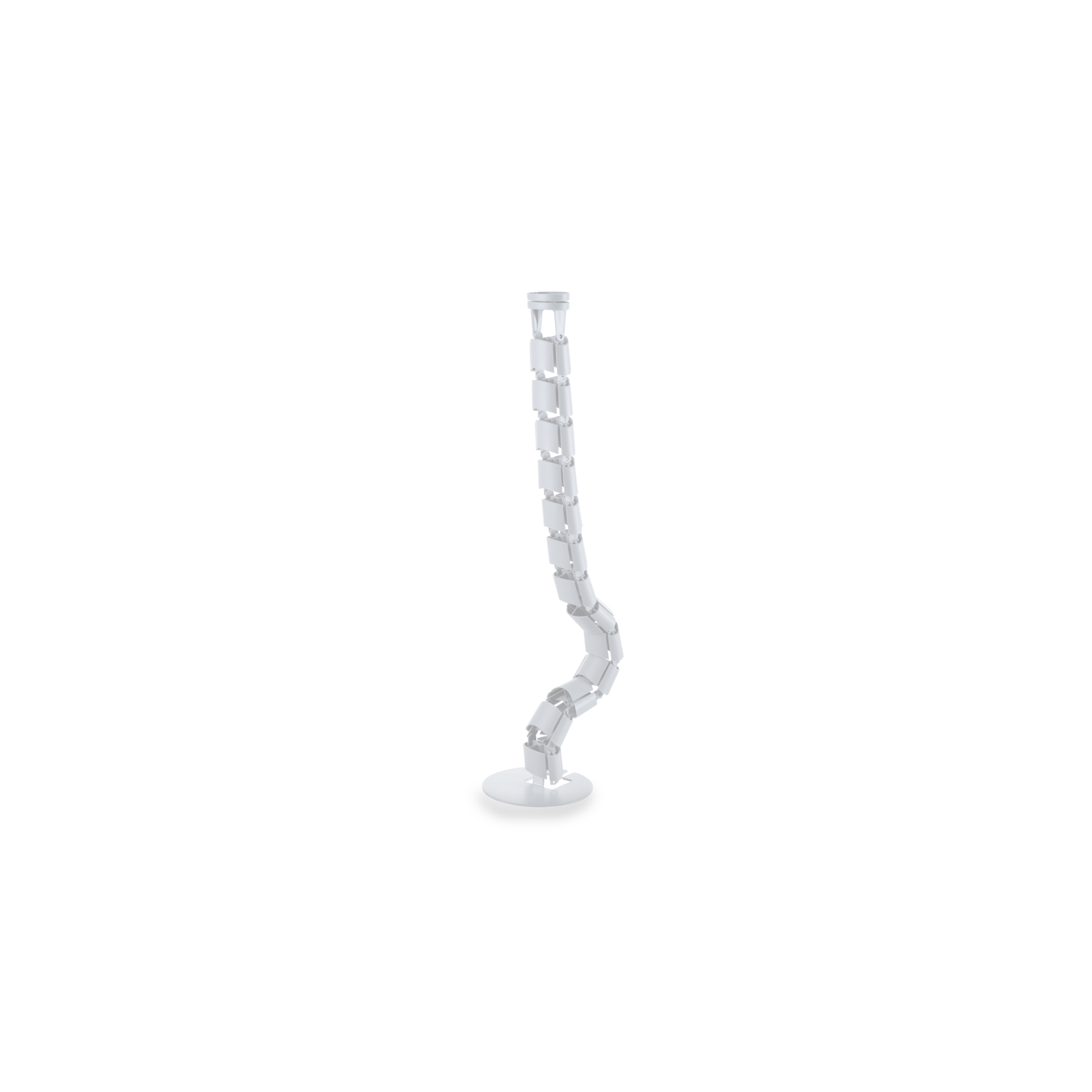
Cable spines (or snakes) are the articulated, concertina-style sleeves that run from the underside of the desk down to the floor or to a power source. They exist for one reason: to stop cables stretching, kinking or snapping when a desk moves. This matters far more on height-adjustable desks than fixed ones.
Grommets and ports are the round or rectangular cutouts (or add-on fittings) in the desk surface that let cables pass through cleanly instead of trailing over the edge. Alxr’s Under Desk Power Module works well alongside a grommet, putting sockets within reach without another trailing extension lead.
Clips and ties are the small-scale fix, bundling two or three cables along a desk edge or leg. They solve clutter, not capacity.
Trunking and cable boxes hide cables along skirting boards or walls, or bundle them into a plastic enclosure on the desk. They’re a cosmetic fix. A basic box can tidy a small bundle of cords, but sealed boxes trap heat, which becomes a genuine problem once you add a multi-port charger or a docking station brick.
Solution types at a glance:
- Under-desk trays: best for power strips, multiple adapters, and permanent workstations.
- Articulated spines: essential for sit–stand desks and any setup where the desk moves.
- Grommets and in-desk power: best where cables need to pass through the desk surface cleanly.
- Clips and ties: fine for light bundling, not for load-bearing cable runs.
- Trunking and boxes: quick aesthetic fixes for low-heat, low-cable-count setups only.
Heavier setups, meaning two monitors, a docking station and several chargers, need a tray rated for that weight, not a decorative box designed for two or three cords.
How do you choose the right cable management for your office?
Before ordering anything, work through this checklist. It takes ten minutes per desk and prevents the two most common procurement mistakes: undersized trays and adhesive fixings that fail within months.
- Measure cable volume and power brick sizes first. Count every cable and every plug-in adapter at the desk, not just the obvious laptop charger. Docking stations and monitor power bricks are often the bulkiest items and the ones people forget to measure.
- Size the tray properly. For anything beyond a single laptop setup, aim for trays at least 5 to 6 inches wide with screw-in mounting rather than adhesive pads. Sticky-back fixings work loose under sustained weight, usually within weeks rather than years.
- Check ventilation needs. Heat-producing adapters, laptop chargers and docking stations especially, need open-mesh or perforated metal trays. Sealed plastic boxes are fine for cosmetic tidying but poor for anything generating real heat.
- Confirm sit–stand compatibility. If the desk is height adjustable, specify an articulated spine sized for the desk’s full range of travel, with slack built in for the highest setting.
- Decide on access and documentation. Will you need to reach the tray regularly? A tilting tray or removable lid saves time later. Label cables now, while you can still tell which is which.
Pro Tip: Before buying any tray, standardise on wireless keyboards and mice where you can. Fewer cables at the point of installation means smaller, cheaper trays and less to reroute when equipment changes.
Sit–stand desks: where cable management usually fails
Height-adjustable desks introduce a problem fixed desks never face: movement. The most common failure is what’s sometimes called the “cable waterfall”, where cords bunch at the top of the desk’s travel, then yank taut and disconnect (or fray) at the bottom. An articulated spine is the fix, and it’s the single component that prevents repeated cable failure on adjustable desks.
Getting it right means:
- Sizing the spine to the desk’s maximum height, not just its resting position.
- Leaving genuine slack at the top of the travel range, not a taut line that looks tidy at desk-sitting height and pulls tight the moment someone stands.
- Routing cables clear of the motor housing, since both moving parts and heat sit there.
- Using in-desk power modules and linking hardware, rather than loose extension leads, to take the physical strain off individual plug sockets.
Alxr’s Under Desk Linking Mechanism exists precisely for this: securing under-desk components so they move with the desk instead of against it. Combined with a smart adjustable desk built with routing in mind, the whole system moves as one unit rather than fighting itself every time someone raises the desk.
How do you install and maintain office cable management?
A tidy install now saves a service call later. Follow this sequence:
- Measure the desk’s underside clearance, cable count and power brick dimensions.
- Select tray or spine based on that measurement, not the other way round.
- Secure mounting with screws, not adhesive, for anything carrying real weight.
- Connect the power module or PDU before bundling anything else.
- Bundle and label cables, then run the desk through its full movement (if adjustable) to check for snagging.
- Test the setup under normal load before calling it finished.
For fastenings, hook-and-loop straps beat single-use zip ties every time equipment changes, because you can undo and reposition them without cutting anything. Mounting the power strip itself under the desk rather than leaving it on the floor also keeps the whole run visible and easy to check.
Maintenance is light but shouldn’t be skipped: a visual inspection and thermal check once a year, and a proper dust clean of trays every 6 to 12 months, particularly around anything with a fan or a heat-producing adapter. A DIY tidy of a single desk takes an afternoon. A professional install across a floor of desks is usually scheduled in half-day or full-day blocks, depending on desk count and whether power modules need first fix wiring.
Why choose Alxr for office cable management?
Alxr supplies more than 10,000 workspace products, which means the tray, spine and power module you choose are specified to work with the desks you’re actually buying, not retrofitted from a generic parts catalogue. Alxr is also an NHS-approved supplier, a standard that reflects the compliance and quality checks procurement teams in regulated sectors need to see.
- The Vertical Cable Manager handles vertical routing from desktop to floor, keeping runs off the ground and clear of foot traffic.
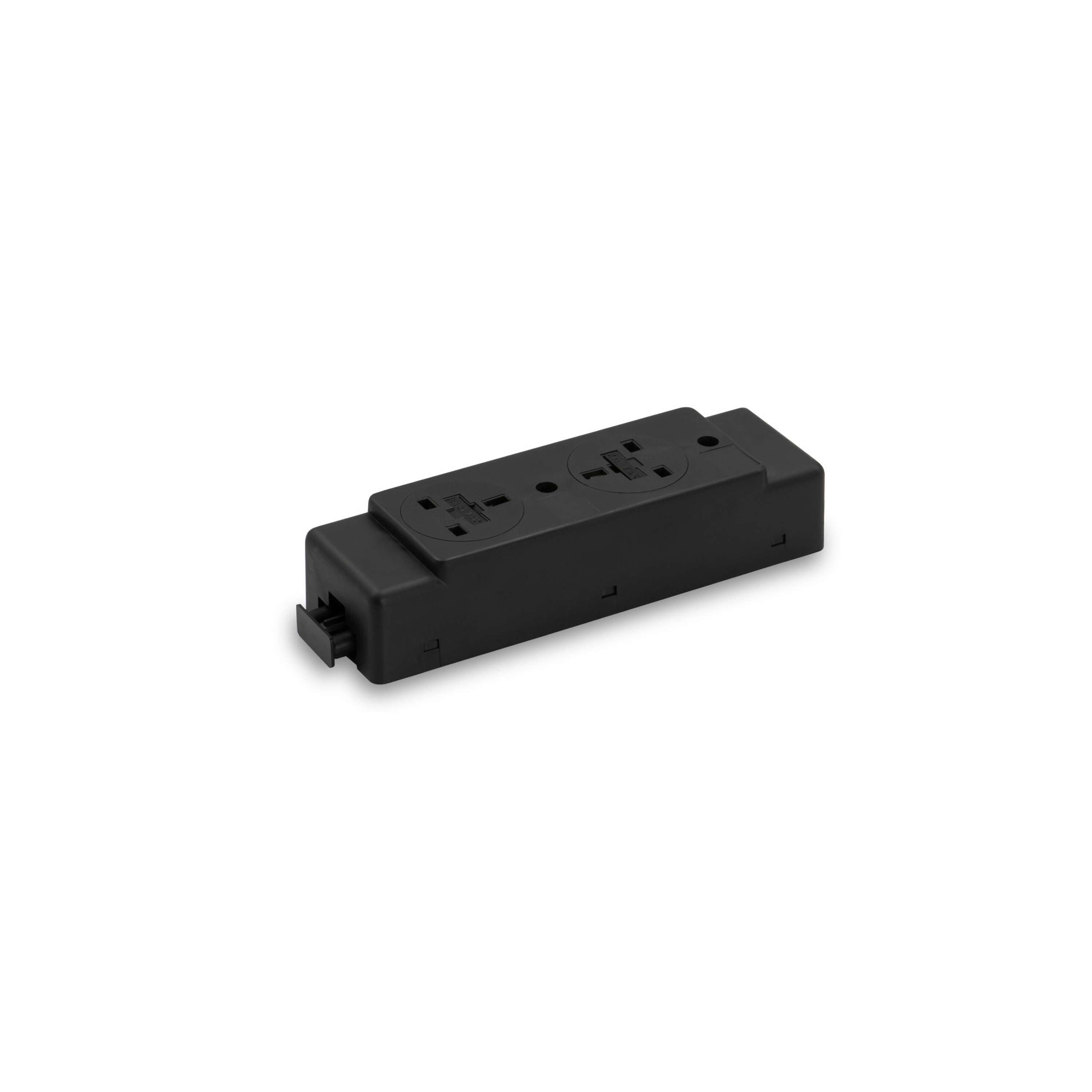
- The Under Desk Power Module centralises sockets under the desk, reducing the extension leads and loose adapters that clutter a workstation.
- The Under Desk Linking Mechanism secures components together for sit–stand desks, so cabling moves with the desk rather than snagging on it.
Nationwide delivery and installation, alongside warranty and aftercare support, mean a facilities team can specify a multi-desk rollout and have it fitted without managing multiple contractors.
How do you manage cables in shared or multi-user offices?
Hot-desking and shared benches introduce a problem single-owner desks don’t have: nobody feels responsible for the mess, because nobody owns the desk long-term.
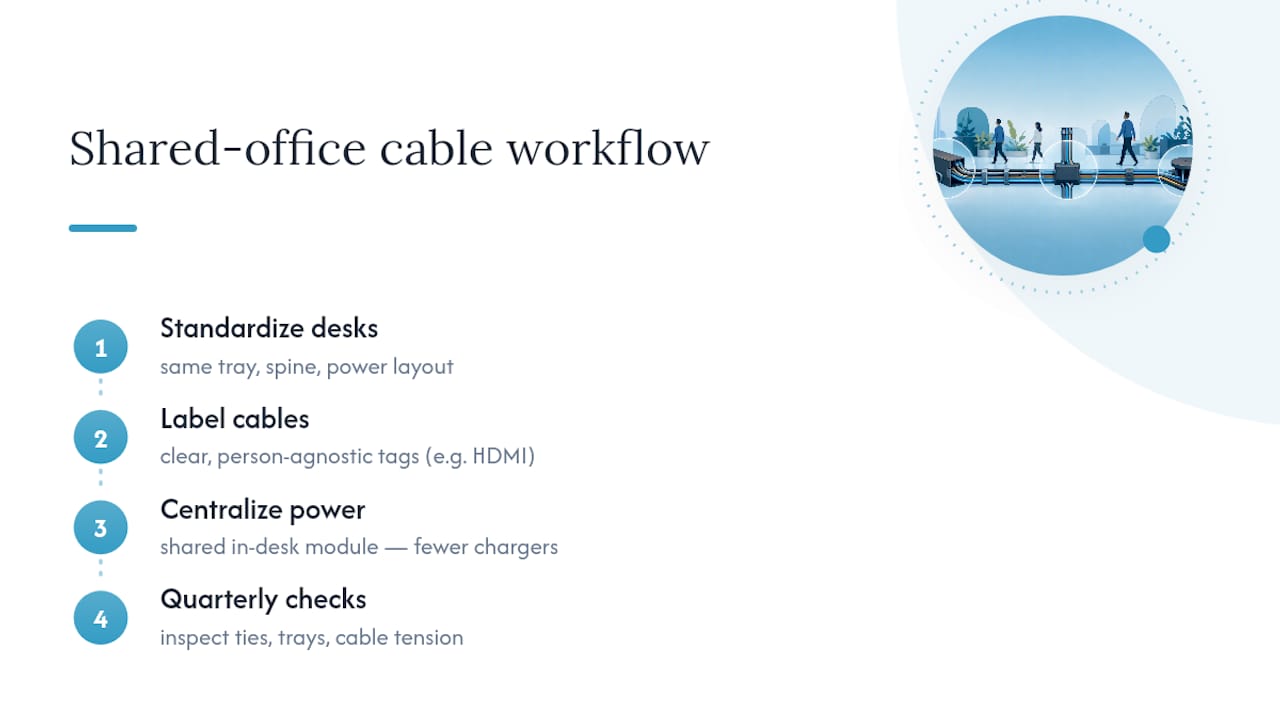
The fix is standardisation. Fit every desk in a bank with the same tray, spine and power module configuration, so a user moving from desk to desk finds the same layout every time. That consistency also means facilities teams only need to stock one type of replacement part, rather than a different fitting for every desk generation bought over the years.
Label everything, and label it for the next person, not just yourself. A cable labelled “monitor 2” means nothing to a colleague three desks down; “HDMI, left monitor” does. In banks of desks sharing a single trunking run, colour-coded ties or tags per desk prevent one person’s cable change turning into an afternoon of tracing wires for the whole row.
Centralise power where you can. An in-desk power module shared across a bench reduces the number of individual chargers plugged into wall sockets, which in shared spaces multiply fast as people bring their own laptops and peripherals. It also cuts down on the loose extension leads that tend to appear when desks are reconfigured for different teams.
Finally, build a light maintenance habit into the space itself: a quarterly walk-through checking for loose ties, overloaded trays or cables pulled taut by desk height changes, catches problems before they become a hazard.
What are the most common cable management mistakes?
The first mistake is buying a cosmetic box for a workstation with real cable volume. A plastic enclosure is fine for two cords behind a home desk; it’s the wrong choice for a docking station, two monitors and a laptop charger, all generating heat in an enclosed space. Ventilated trays exist for exactly this reason.
The second is relying on adhesive-mounted trays for anything with weight to it. Sticky pads hold for a few weeks under light load, then sag or detach entirely once a power strip and three adapters sit in them. Screw mounting costs a few extra minutes and solves this permanently.
The third, and the one that causes the most repeat service calls, is under-sizing spines on sit–stand desks. A spine cut to the desk’s sitting height will stretch, kink or disconnect the first time someone raises the desk fully. Always size to maximum travel, with slack to spare.
The fourth is skipping labels. It feels unnecessary on day one and becomes a genuine time cost the first time someone needs to trace a single cable through a bundle of a dozen others.
The fifth is ignoring ventilation entirely, tucking a charging brick into a sealed compartment because it looks tidier. Heat-producing adapters need airflow; a sealed box shortens the working life of the hardware inside it.
A procurement view: what’s worth the extra spend
Ventilated metal trays earn their higher price on any desk running two or more heat-producing adapters. Mesh nets look similar but sag over time and dissipate heat far less effectively. For sit–stand desks, an articulated spine isn’t optional. It’s the one component protecting your cabling from the desk’s own movement.
Choose a professional install for multi-desk rollouts, anywhere warranty terms depend on correct fitting, or wherever the power setup is more complex than a single strip. For single desks, a well-measured DIY tidy with screw-mounted hardware and Velcro straps does the job. Either way, keep a simple record of what’s routed where. It saves the next person real time.
— Syed
Order office cable management products from Alxr
Alxr sells the exact components this guide recommends, ready to specify against the checklist above rather than guessed at from a generic parts list. Each product below solves one part of the setup, and all three are backed by Alxr’s warranty and aftercare support, plus its NHS-approved supplier status for teams in regulated sectors.
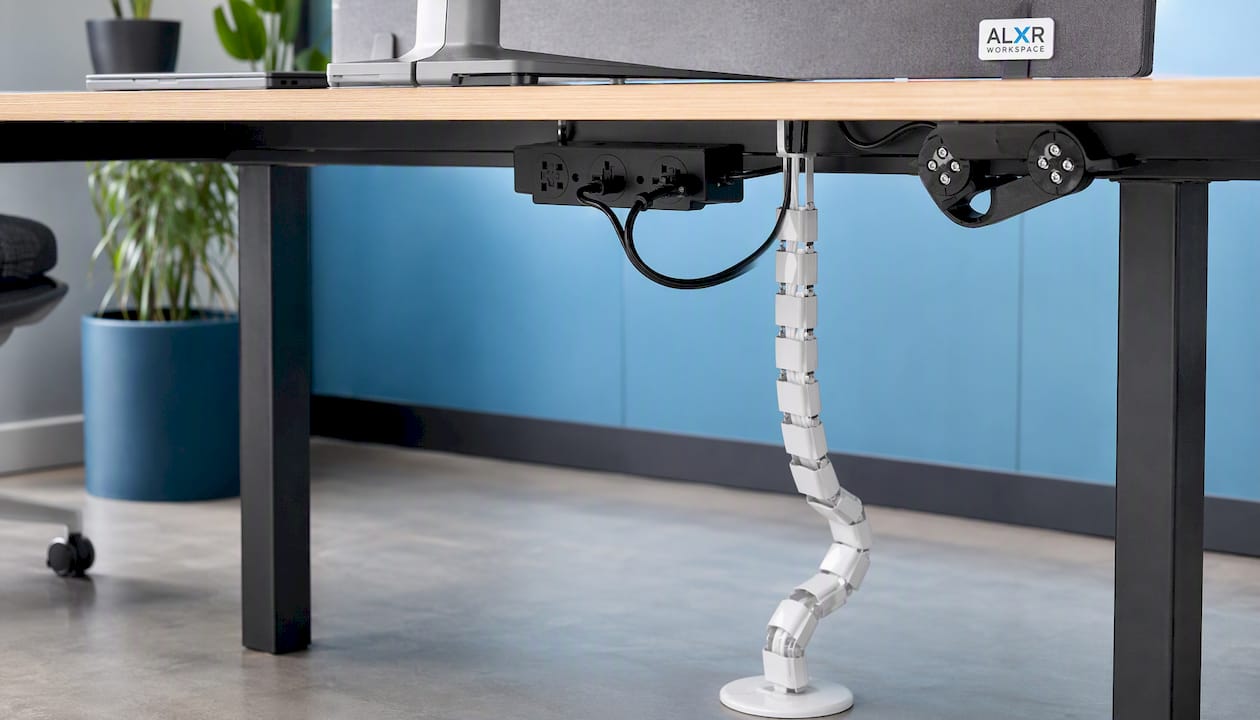
- Vertical Cable Manager: routes cables cleanly from desktop to floor, keeping runs off the walkway. Backed by Alxr’s standard warranty.
- Under Desk Power Module: centralises sockets under the desk to cut down on loose extension leads. Fits Alxr’s smart adjustable desks directly.
- Under Desk Linking Mechanism: secures under-desk components on sit–stand desks so cabling moves with the desk, not against it.
Browse the full range on the Alxr Workspace site, check product specs against your desk dimensions, and get in touch to arrange nationwide delivery and installation for single desks or full office rollouts.
Sources
- The complete guide to workplace cable management — The Ramp People
- Cable safety in the office: a practical guide — Health & Safety Event
- Cable tray (medium duty) — Channel & Tray
- Office wire and cable management tips — BDI Design Blog
Recommended
- Circular In-Desk Power Module + 3 Metre Mains Cable Bundle | 1 Outlet | 30W USB-C, 27W USB-A, USB-A Blank | White Housing/White Bezel/White Veneer
- Rectangular In-Desk Power Module + 3 Metre Mains Cable Bundle | 1 Outlet | Synapse™ 100W USB-C, 27W USB-A | White/White
- Cable Baskets with Brackets | 100mm x 50mm x 600mm | Silver
- Desktop Power Module + 3 Metre Mains Cable Bundle | 1 Outlet | 100W USB-C, 27W USB-A | White/White