

Fixing office chair lumbar support: what works and when to upgrade
If your lower back aches by mid-afternoon, adjust your chair’s lumbar height first, then try a well-shaped lumbar cushion if that isn’t enough. Adjustable built-in lumbar support is the most reliable long-term fix because it moves with your body across a working day. Removable cushions are a genuinely effective short-term or portable solution, particularly for mild lower-back pain and poor posture caused by an unsupportive chair.
Do this now:
- Check whether your chair’s lumbar support has height or depth adjustment, and set it so the curve sits in the small of your back.
- If there’s no adjustability, add a contoured lumbar cushion with a securing strap rather than a loose pillow.
- If pain persists after two weeks of correct adjustment, or the backrest has no lumbar contour at all, it’s time to replace the chair.
Key Takeaways
Adjustable built-in lumbar support outperforms after-market cushions for daily, multi-hour sitting, while well-fitted removable cushions remain a genuinely effective interim fix for mild discomfort.
| Point | Details |
|---|---|
| Adjustability beats cushioning | Chairs with height and depth adjustable lumbar mechanisms outperform fixed backrests over multi-hour sitting. |
| Fit the sequence, not just the shape | Set seat height, then depth, then lumbar position, then arms, in that exact order. |
| Choose resilient foam | Slow-rebound or contoured foam holds its shape longer than basic density memory foam. |
| Know your red flags | Persistent pain after correct adjustment, or leg numbness, means see a clinician rather than buy another cushion. |
| Upgrade when adjustability is absent | Alxr’s Vision Mesh Office Chair and Zip Mesh Back Chair offer NHS-approved adjustable lumbar support with nationwide delivery. |
Table of Contents
- What does effective office chair lumbar support actually look like?
- What types of lumbar support solutions should you consider?
- How do you choose the right lumbar support for your body and chair?
- How do you fit and position lumbar support correctly?
- Common mistakes, upkeep and when it’s more than a chair problem
- Why does lumbar support actually matter for your health and work?
- Which materials and firmness levels work best for lumbar cushions?
- Which office chairs offer genuinely superior lumbar support?
- How do popular removable lumbar cushions compare?
- When should you get a professional ergonomic assessment?
- Why adjustability beats comfort claims every time
- Which Alxr chairs solve which lumbar problems?
- Sources
What does effective office chair lumbar support actually look like?
Your spine has a natural inward curve at the lower back, called the lumbar lordosis. When you sit, that curve tends to flatten or reverse unless something fills the gap between your back and the chair. That’s the entire job of lumbar support: closing the gap without pushing your pelvis forward or flattening the curve the other way.
Good support follows three rules:
- Shape – it should mirror the S-curve of your spine, not press a single hard ridge into one point.
- Position – it needs to sit at the apex of your lower back curve, roughly at belt height for most adults, though this varies with torso length.
- Adjustability – height and depth adjustment matter because a six-foot frame and a five-foot-two frame need the support in different places on the same chair.
A simple test: sit upright, close your eyes, and notice whether the support touches the small of your back without effort. If you have to lean back deliberately to feel it, the height or depth is wrong. Wirecutter’s testing of office chairs found that chairs offering a genuinely adjustable lumbar mechanism consistently outperformed fixed backrests over multi-hour sitting sessions.
What types of lumbar support solutions should you consider?
There isn’t one correct answer here. The right choice depends on how long you sit, whether you share a desk, and whether your current chair has any adjustability worth keeping.
- Integrated adjustable lumbar mechanisms. Built into the chair and moved via a dial or lever, these are the strongest long-term option because they’re calibrated to the chair’s own recline and seat depth. The downside is cost: you’re buying a whole chair, not a £30 accessory.
- Removable lumbar cushions. Memory foam or contoured foam pads that strap to an existing chair back. These are an affordable, effective remedy for mild discomfort and poor posture when your current chair offers nothing, though they slip out of position if the strap is weak or the foam has gone soft.
- Inflatable lumbar supports and adjustable straps. These let you pump up or deflate the support to change height, which suits people who share a workstation. They’re fiddly to fine-tune daily and the seams can dig in if overinflated.
- Seat height, depth and tilt adjustments. Often overlooked and completely free. Correcting seat depth alone can bring your lower back into contact with an existing backrest that seemed useless before.
Most people get the fastest relief from combining option four with either option one or two, rather than treating lumbar support as an isolated accessory purchase.
How do you choose the right lumbar support for your body and chair?
Start with measurement, not guesswork. Sit in your usual position and get someone to measure from the seat to the point where your lower back curves inward. That figure tells you roughly where a cushion’s centre or a mechanism’s adjustment range needs to land.
Then check compatibility:
- Does your chair’s backrest have a flat panel a cushion strap can wrap around, or is it a mesh or contoured shell that resists attachment?
- Can you adjust height and depth, or only one? Height alone rarely fits torso length precisely enough.
- Is the foam described as resilient or slow-rebound? Cheaper cushions flatten within months and stop supporting the curve at all.
- Does the cover breathe, or will you be sitting against solid foam for eight hours?
Watch for red flags: any cushion so thick it tilts your pelvis forward, or one with no strap and a “just lean against it” design that slides the moment you shift position. Quick-release straps and universal fit designs solve the slippage problem on most standard office chairs.
Pro Tip: If you’re between two cushion thicknesses, choose the thinner one. It’s far easier to add a second thin layer later than to fix a cushion that’s already pushing your spine into an unnatural forward curve.
How do you fit and position lumbar support correctly?
Getting the shape right matters less than getting the setup sequence right. Do these in order, not randomly:
- Set seat height first. Feet flat on the floor, knees at roughly 90 degrees. Everything else depends on this being correct before you touch the backrest.
- Set seat depth. Leave a two to three finger gap between the back of your knee and the seat edge. Too deep, and you can’t reach the backrest without slouching.
- Locate your lumbar apex and fill it. Find where your lower back curves inward and adjust the mechanism or cushion to meet that point exactly. Don’t force it forward past where your spine naturally sits.
- Adjust armrests and recline together. Set arm height so shoulders stay relaxed, then check the lumbar support still makes contact when you recline slightly. If it loses contact on recline, the mechanism needs raising.
Pro Tip: Sit for 20 to 30 minutes after adjusting and pay attention to three things: whether your lower back feels warm rather than sore, whether you’re sitting upright without conscious effort, and whether your breathing feels unrestricted. All three suggest a correct fit.
Common mistakes, upkeep and when it’s more than a chair problem
The most frequent error is positioning support too low, which tends to happen because people set it while slouched rather than sitting upright. The second is choosing a cushion so firm it acts like a wedge, forcing the pelvis forward instead of supporting the natural curve. Overly thick or rigid lumbar wedges can genuinely make posture worse than having no support at all.
Maintenance is simple but often skipped:
- Wipe or wash covers monthly, since sweat and skin oils break down foam faster than use alone.
- Check strap stitching every few months. A stretched strap is why cushions start sliding.
- Replace foam once it stays compressed after you stand up. That’s the clearest sign resilience has gone.
See a GP or physiotherapist if pain is new, worsening, or spreading into your legs, or if correct setup for two to three weeks brings no improvement. If your chair has no lumbar contour and no way to add one, no cushion will fully compensate.
Why does lumbar support actually matter for your health and work?
Poor lumbar support doesn’t just cause backache. It changes how you breathe, how alert you feel, and how much energy you have left by 3pm. When your lower back curve collapses, your ribcage compresses slightly, which restricts the diastolic expansion of your lungs and makes shallow breathing more likely across a long sitting session.
There’s also a posture domino effect. Once your pelvis rolls backward from lost lumbar contact, your shoulders round forward to compensate, and your neck cranes to keep your eyes level with the screen. What started as a lower-back problem becomes a shoulder and neck problem within weeks.
The productivity angle is less about willpower and more about discomfort stealing attention. Every time you shift position to relieve an ache, that’s a small break in concentration, and those breaks compound across a working day. Comfortable, well-supported sitting removes that background distraction entirely rather than just dulling it.
There’s a financial case too. Replacing a chair or adding a proper cushion costs far less than repeated physiotherapy appointments or time off work for a flare-up. Treat lumbar support as preventative rather than reactive, and you avoid the far more expensive route of fixing a problem that’s already become chronic.
Which materials and firmness levels work best for lumbar cushions?
Material choice affects how a cushion performs over months, not just on day one. Memory foam and adaptive slow-rebound foam mould closely to your spine’s shape and give immediate contouring comfort, which is why they dominate the market. The trade-off is that cheaper memory foam loses resilience faster, so choosing a cushion described as slow-rebound or resilient rather than basic density foam matters more than the price tag suggests.
Contoured moulded foam, shaped rather than compressed, holds its form longer under repeated pressure than blended fillings. It costs more upfront but typically outlasts standard foam by a wide margin.
On firmness, medium is the safer default for most people. A cushion that’s too soft compresses flat within an hour and stops doing its job. One that’s too firm creates a pressure point rather than a supportive curve, which can be worse than no cushion at all if it forces your pelvis forward.
Breathable, washable covers matter more than people expect. Mesh or moisture-wicking fabric prevents the sweating that speeds up foam breakdown, and a removable cover means you can actually keep the thing clean rather than replacing it early out of hygiene rather than wear.
If you’re unsure, err towards firmer-but-thinner over softer-but-thicker. A thin, resilient cushion that holds its shape for two years beats a plush one that flattens in three months.
Which office chairs offer genuinely superior lumbar support?
Price correlates loosely with lumbar quality, but not as tightly as most buyers assume. Entry-level chairs under £150 rarely offer more than a fixed lumbar bulge with no height adjustment, which suits shorter sitting sessions but struggles across a full working day.
Mid-range chairs between £150 and £400 typically introduce height-adjustable lumbar mechanisms and often depth adjustment too. This is the bracket where most people sitting six or more hours a day should be shopping, because it’s where adjustability stops being a luxury feature and starts being standard.
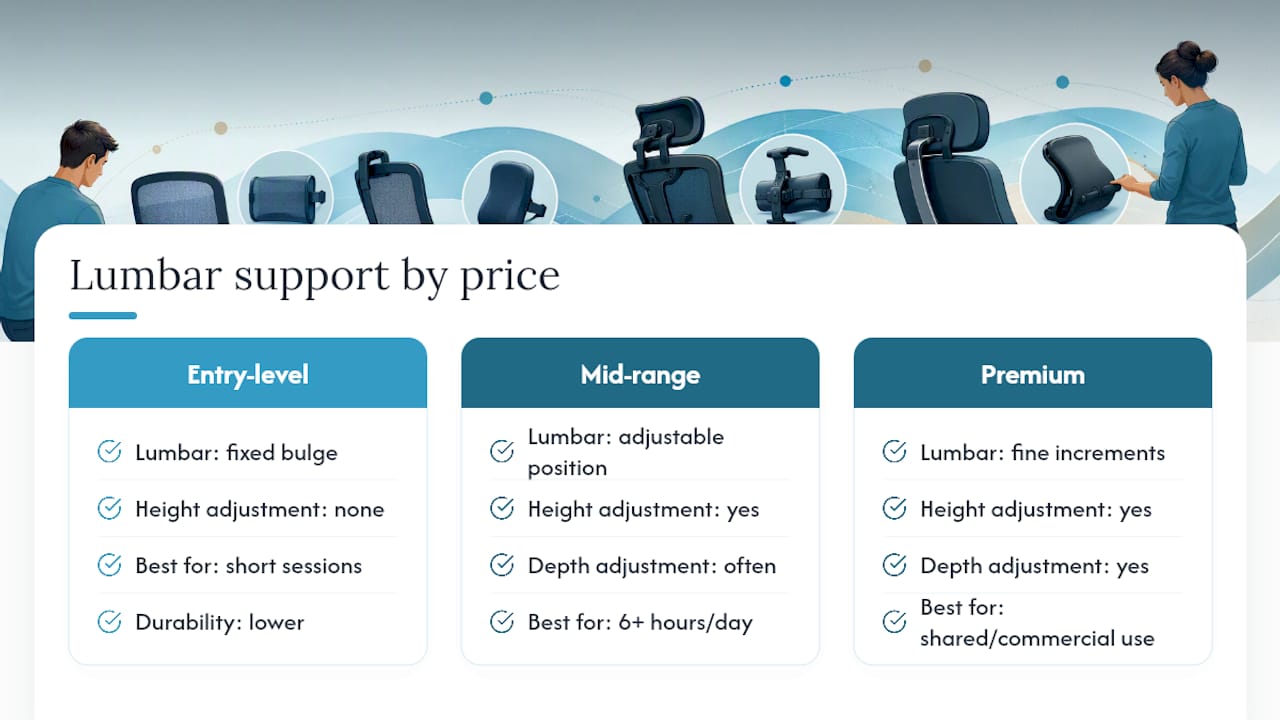
Premium chairs above £400 usually add finer adjustment increments, more durable mesh, and mechanisms rated for heavier daily use, which matters in shared or commercial settings more than at a single home desk.
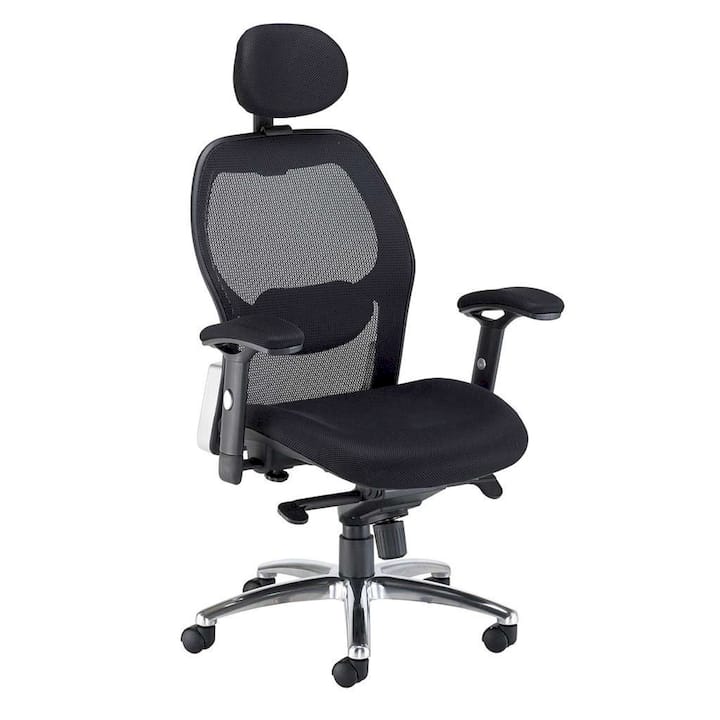
Alxr’s Vision Mesh Office Chair sits in that mid-to-premium bracket, built around a mesh back with adjustable lumbar positioning that suits daily, multi-hour use rather than occasional sitting. For setups needing folding arms for space or shared-desk flexibility, the Zip Mesh Back Chair with Folding Arms covers that need without sacrificing the lumbar mechanism. Both beat an after-market cushion bolted onto an unsupportive shell, because chairs with genuine adjustable lumbar built in reduce the need for cushions altogether and tend to be the better long-term investment for anyone sitting daily.
How do popular removable lumbar cushions compare?
Removable cushions split roughly into three camps, and knowing which one you’re buying prevents a wasted purchase.
Strap-secured contoured cushions are the most reliable category. Vive’s approach uses a quick-release strap and universal fit so the cushion stays anchored across office chairs, car seats, and sofas alike, which matters if you split time between a desk and a laptop on the sofa.
Slow-rebound memory foam cushions, like the NeoCushion design, prioritise immediate mould-to-spine comfort. They feel plush from the first sit, but check the foam is described as resilient rather than standard density, since basic memory foam in this category can flatten within a few months of daily use.
Wedge-style firm cushions sit at the opposite end. They’re marketed for posture correction but carry real risk if oversized. A wedge that’s too aggressive tilts the pelvis forward instead of supporting the natural curve, which several manufacturer warnings now flag directly.
For anyone testing the waters before committing to a full chair upgrade, a strap-secured, medium-firmness contoured cushion is the safest starting point. It’s also the easiest to move between chairs if you work from more than one location during the week.
When should you get a professional ergonomic assessment?
Self-adjustment solves most everyday discomfort, but there’s a clear line where it stops being enough. If you’ve corrected seat height, seat depth, and lumbar position exactly as described here and pain hasn’t eased within two to three weeks, that’s your signal to stop guessing and get an assessment.
Certain symptoms mean don’t wait at all: pain radiating down one or both legs, numbness or tingling in your feet, or any weakness when standing. These can indicate nerve involvement rather than a simple postural issue, and a GP or physiotherapist needs to rule that out before you spend more money on chairs or cushions.
A workplace ergonomic assessment is worth requesting even without severe symptoms if you’re spending more than six hours a day seated. Many employers, particularly in the NHS and public sector, have occupational health teams who can assess your setup on-site and recommend specific adjustments or equipment. This is often free through your employer and catches issues a self-check misses, such as monitor height interacting badly with your neck position even when your lumbar support is technically correct.
If you’ve been managing chronic lower-back pain for months, treat chair adjustment as one part of a broader plan rather than the whole solution. A physiotherapist can identify whether muscular imbalance, not just chair fit, is driving the discomfort.
Why adjustability beats comfort claims every time
Most advice on this topic focuses on softness and cushioning, as if lumbar support were about how nice a chair feels in the showroom. That’s the wrong lens entirely. A cushion or backrest that feels plush after thirty seconds can still be the wrong shape for your spine after three hours, and showroom comfort tells you almost nothing about six-hour comfort.
What the evidence actually supports is narrower and less exciting: adjustability outperforms cushioning nearly every time, because your body’s needs shift throughout the day and a fixed shape, however well designed, can’t track that. The conventional advice to “just add a cushion” isn’t wrong, but it’s incomplete. A cushion without proper positioning and a secure strap is a placebo at best and a pelvis-tilting problem at worst.
If you take one thing from this guide, prioritise a chair or mechanism you can adjust over one that simply feels soft on day one. Fit it correctly using the sequence in this piece before assuming the product itself has failed you.
— Syed
Which Alxr chairs solve which lumbar problems?
If you’ve worked through the adjustments above and your current chair still can’t hold a lumbar curve, the fix is a chair with genuine adjustability built in, not another cushion layered onto a lost cause. Alxr is an NHS-approved supplier with a catalogue built specifically around the adjustability this guide has argued matters most, backed by nationwide delivery and installation so you’re not assembling a lumbar mechanism from a flat-pack instruction sheet.
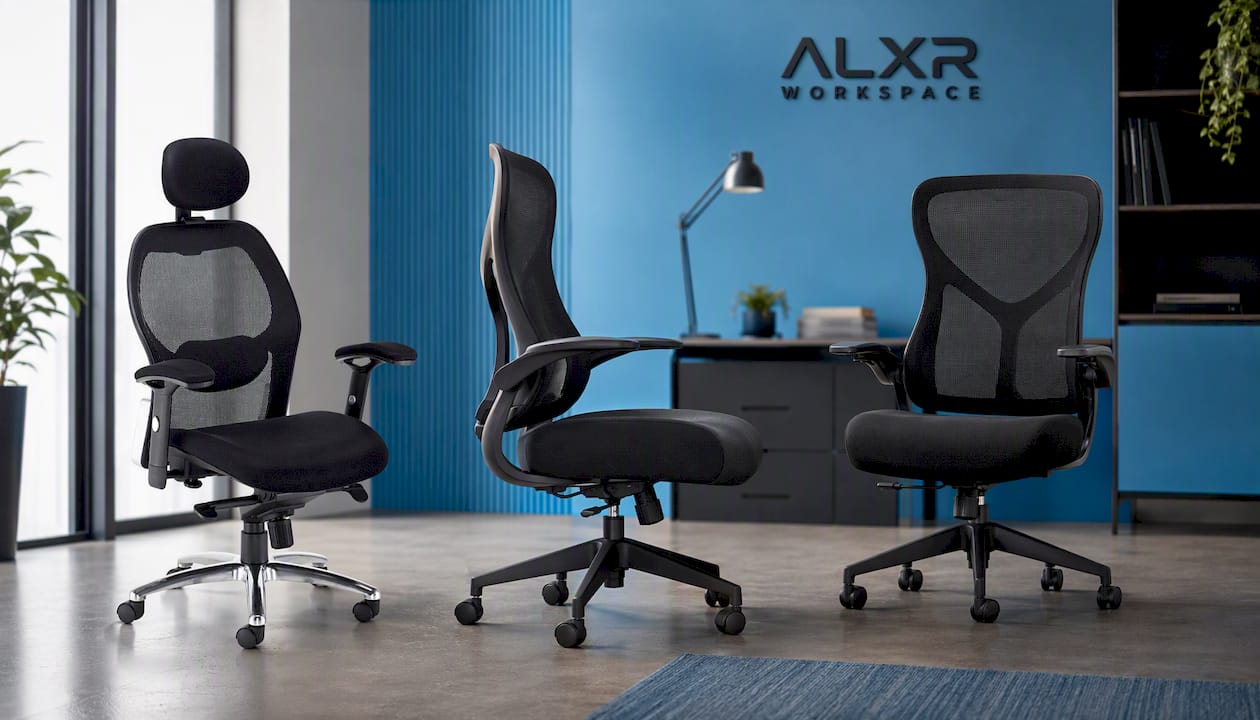
Match yourself to the right option rather than guessing. The Vision Mesh Office Chair suits longer torsos and anyone sitting six or more hours daily, thanks to its independently adjustable mesh lumbar zone. Shorter-torso users or those on shared or flexible desks tend to fit the Zip Mesh Back Chair with Folding Arms better, since its folding arms suit tighter or rotating workstations without losing lumbar adjustment. If your existing chair has decent lumbar support but poor arm positioning is throwing off your posture, Versi Adjustable Arms fixes that specific gap without a full replacement.
Every Alxr chair purchase includes warranty support, so if the adjustment range doesn’t suit your body once it arrives, you’re not stuck with it. Browse the full range and check delivery timelines at Alxr Workspace to find the right fit for your desk today.
Sources
- The 5 Best Office Chairs, According to Our Testing | Reviews by Wirecutter
- Full Lumbar Support Cushion - Lower Back Pillow — Vive Health
- Original NeoCushion™ Lumbar Support Pillow