

Office Typists: Keyboard Trays Produce 80% Neutral Wrist Motion
A keyboard tray works best for long-duration typists stuck at fixed-height desks, especially anyone feeling wrist, elbow, or shoulder strain by mid-afternoon. Properly configured, with the right height, negative tilt and mouse alignment, it improves wrist neutrality and eases shoulder tension. Set up badly, it can create new problems rather than solve old ones.
TL;DR:
- Proper keyboard tray setup with negative tilt and correct height significantly reduces wrist extension and shoulder shrugging during long typing sessions.
- In peer-reviewed studies, downward-tilting trays increased neutral wrist movements above 80% and decreased upper-body discomfort after three weeks of use.
- Common setup mistakes, such as insufficient desk clearance, wobble, or incorrect tilt, often negate the ergonomic benefits of a tray.
- Compatibility issues like knee clearance, desk depth, and mounting type must be checked before purchasing to avoid installation failure.
- For shared workstations, quick-adjust trays and external keyboards are practical solutions, while seated long-stay typists see the most benefit.
Table of Contents
- What are the keyboard tray benefits for wrist and shoulder comfort?
- What does the research say about posture and discomfort?
- What are the common problems with keyboard trays?
- How do you set up and adapt to a keyboard tray?
- Should you buy a tray or fix the problem another way?
- Which mounting type suits your desk?
- How do keyboard trays compare with other ergonomic fixes?
- Does a keyboard tray actually improve comfort over time?
- Who benefits most from a keyboard tray?
- The honest verdict on keyboard trays
- How does ALXR help you get the fit right?
- Sources
What are the keyboard tray benefits for wrist and shoulder comfort?
The core keyboard tray benefits come down to geometry. Most desks sit at a fixed height designed for writing, not typing, which pushes your wrists into extension and your shoulders into a permanent shrug. A tray lets you lower the keyboard below desk level and angle it away from you, known as negative tilt, so your wrists stay closer to neutral and your elbows settle nearer 90 degrees.
That single adjustment does more work than most people expect. When the keyboard sits too high, you compensate by lifting your shoulders and cocking your wrists upward, an posture that, held for eight hours a day, adds up to genuine strain. Dropping the typing surface a few centimetres and tilting it downward reverses that chain: elbows relax, shoulders drop, wrists straighten.
A tray does more than fix posture, though. It reclaims real desk space. Once the keyboard moves under the desktop, the surface above becomes free for monitors, documents, or a second screen, which matters enormously on compact or shared desks where every centimetre counts.
Quick fact: In peer-reviewed testing, a downward-tilting tray pushed neutral wrist movements above 80% in the test group, alongside lower self-reported upper-body discomfort.
Practical advantages worth weighing before you buy:
- Wrist neutrality: Height and negative tilt combine to keep wrists straighter through long typing sessions.
- Shoulder relief: Lowering the keyboard reduces the reach and shrug that fixed-height desks tend to force.
- Desk space reclaimed: Freeing the desktop surface helps on smaller or shared workstations, and tidies cable runs in the process.
- Cable management: Keyboard and mouse cables tuck beneath the desk rather than trailing across it, a topic covered in detail on the SzopaLabs blog about workspace organisation.
- Laptop compatibility: Anyone using a laptop with an external keyboard gets the same ergonomic gains without buying a new desk.
Trays also suit shared workstations well. If several people use the same desk across shifts, a tray with height and tilt adjustment lets each person reset the geometry in seconds rather than fighting a fixed setup that only ever fits one body properly. That flexibility is often underrated compared with the posture argument, but for hot-desking offices, it can matter just as much.
Compatibility is worth checking before purchase. Most trays clamp or bolt beneath standard desks, and the better ones fit both fixed-height and sit-stand desks, though you should confirm clearance at your desk’s lowest sit-stand position before assuming a smooth fit.
What does the research say about posture and discomfort?
The most cited evidence on keyboard trays comes from a controlled study published in the journal Ergonomics, which measured wrist posture during typing with different tray configurations. Participants using a downward-tilting tray spent over 80% of their typing movements in the neutral wrist zone, a marked improvement over flat or positively tilted setups. The same group reported less upper-body discomfort after three weeks of use.
That finding lines up with what current ergonomics guidance recommends. Manufacturer and workplace guides consistently advise placing the keyboard at or slightly below elbow height, with negative tilt preferred over the positive tilt built into most laptop and keyboard feet by default. The logic holds up under scrutiny: positive tilt (the back of the keyboard raised) forces the wrist to extend upward, which is exactly the posture the 1999 study found trays could reduce.
A few limits are worth flagging honestly:
- Adaptation takes time. Three weeks was the study window; expect a comparable adjustment period before a new tray feels natural rather than awkward.
- It is not a universal fix. Existing conditions such as carpal tunnel syndrome or tendon issues need clinical advice, not just a furniture change.
- Sample and context matter. The original study measured a specific test group under controlled conditions; individual results vary with hand size, typing style, and how well the tray is actually fitted.
None of that undermines the core signal. Neutral wrist posture correlates with less discomfort, and a well-positioned tray is one of the more direct ways to get there without replacing the whole desk. What it does mean is that buying a tray and leaving it flat, or angled the wrong way, throws away most of the benefit the research actually demonstrates.
What are the common problems with keyboard trays?
Trays fail for predictable reasons, and most of them show up before you have even finished installing one.
Knee clearance is the first casualty. Once a tray sits under the desk, it eats into the vertical space your knees need, particularly on desks that were already tight. Measure the gap between your seated knee height and the underside of the desktop before buying. If you have under 15 centimetres of clearance once the tray and its mounting hardware are in place, look at a slimmer profile or reconsider the desk itself.
Wobble and bounce are the second. Cheaper trays, especially clamp-on models on thin desktops, flex under typing pressure. Test stability before committing: press down firmly on the tray’s front edge and watch for visible movement. A tray that dips or bounces will undermine the exact wrist stability you bought it for.
Incorrect setup causes most of the reported disappointment. Buying guides repeatedly flag the same mistakes: a tray too narrow to fit a mouse alongside the keyboard, positive tilt left on by accident, and insufficient desk depth for proper mounting, which forces awkward reach or reduced stability.
Other things to weigh before buying:
- Cost versus benefit: Quality trays with full adjustability cost more than basic fixed shelves, and cheap ones often disappoint.
- Installation complexity: Bolt-mounted trays need drilling; not every desk, or every landlord, allows it.
- When it backfires: A tray fitted to the wrong height or left on positive tilt can worsen wrist extension rather than fix it.
Pro Tip: Before buying, sit at your current desk and check whether your wrists bend upward while typing. If they do not, you may not need a tray at all, just a lower chair or a raised seat height.
How do you set up and adapt to a keyboard tray?
Start with a simple self-test. Sit at your desk in your normal typing posture and look at your wrist angle. If your hands bend upward at the wrist to reach the keys, your keyboard sits too high, and a tray is likely to help. If your wrists already sit flat or slightly angled downward, a tray may add little.
Once you have a tray, work through the setup in order:
- Set the height first. Adjust the tray so your elbows sit close to 90 degrees, with forearms roughly parallel to the floor.
- Add negative tilt. Angle the back of the keyboard downward, away from you. This feels unusual at first but is the setting the research consistently favours over flat or positive tilt.
- Align the mouse. Position it on the same plane as the keyboard, ideally on an integrated platform, so one hand is not reaching upward while the other stays low.
- Fit anti-slip measures. A textured surface or a small front lip stops the keyboard sliding forward once the tray is tilted, a common annoyance with smooth-surfaced trays.
- Add a wrist rest if needed. Use it for pauses between typing bursts, not while actively typing, to avoid resting on it constantly.
Give yourself a genuine adjustment period. Negative tilt in particular feels counterintuitive for the first few days, and most people need two to three weeks of regular use before the new posture feels automatic rather than effortful.
If problems appear, they are usually easy to fix. Wobble often traces back to a loose clamp rather than a faulty tray, tighten the mounting hardware fully. Insufficient depth means the tray cannot fully retract, check your desk’s underside clearance again before assuming the tray itself is faulty. If the mouse feels too far away, reposition the mouse pad rather than the whole tray.
Pro Tip: If your tray feels slippery once tilted, a strip of grip tape along the front edge solves the problem for less than the cost of a new tray.
Should you buy a tray or fix the problem another way?
Run through this checklist before spending money:
- Is your desk fixed-height, with no way to lower it?
- Do you type for long, continuous stretches most days?
- Are you already noticing wrist, elbow, or shoulder discomfort?
- Is desk space tight enough that reclaiming the surface would genuinely help?
If you answered yes to most of these, a tray is a reasonable investment. If your main issue is chair height or foot support, address those first, they are often cheaper fixes with fewer installation headaches.
Trays earn their keep specifically on desks where chair adjustments alone cannot solve both elbow angle and foot support at once. Raise the chair to fix elbow height, and your feet dangle; lower it for your feet, and your wrists go back to extension. That trade-off is exactly what a fixed-height desk creates, and exactly what a tray sidesteps.
Alternatives worth considering before buying a tray outright:
- A height-adjustable desk removes the problem at the source, since prolonged static posture carries its own health risks that a tray alone does not address.
- Chair and footrest adjustment solves milder cases without any new hardware.
- An external keyboard for laptop users avoids the cramped, high-angle typing position laptops force by default.
| Situation | Best first move |
|---|---|
| Fixed-height desk, no budget for a new one | Keyboard tray |
| Desk already height-adjustable | Adjust desk height and tilt keyboard feet down |
| Laptop-only setup | External keyboard plus a stand, tray optional |
| Frequent hot-desking | Tray with quick-release height adjustment |
If you already own or are considering a sit-stand desk, check tray clearance at the lowest sitting position before buying, some trays lose their tilt range once the desktop drops close to typical seated height.
Which mounting type suits your desk?
Trays come in four common mounting styles, and desk compatibility decides which one actually works for you.
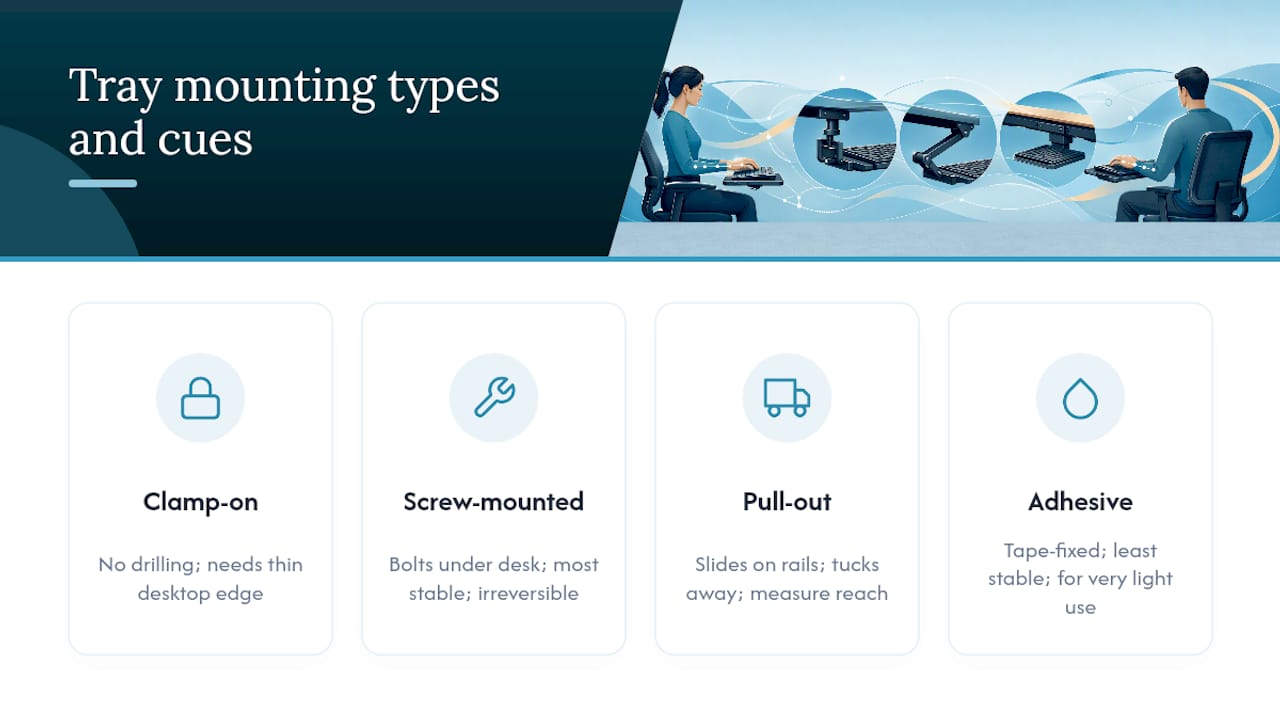
Clamp-on trays grip the underside of the desk without drilling, making them the practical choice for renters or anyone who cannot modify furniture. They need a desktop edge thin enough for the clamp to close around, so check your desk’s edge thickness first.
Screw-mounted trays bolt directly into the desk’s underside and offer the most stability, since nothing relies on friction to stay put. They suit permanent workstations where drilling is acceptable, but they are not reversible without leaving holes.
Pull-out trays slide on rails and tuck fully away when not in use, useful for desks that double as dining or meeting surfaces. Rail length determines how far the tray extends, so measure your reach distance before choosing one.
Adhesive-mounted trays are the least common and generally the least stable, relying on strong tape rather than mechanical fixing. They work only on very light-use setups and are worth avoiding for daily, heavy typing.
Whichever type you pick, depth matters more than most buyers expect: a tray needs enough clearance behind the desk’s front edge to mount securely without fouling drawers, cable trays, or desk legs. Measure before ordering, not after.
How do keyboard trays compare with other ergonomic fixes?
A tray solves one specific problem: keyboard height and angle on a desk that cannot otherwise change. Height-adjustable desks solve a broader one, letting you alternate between sitting and standing throughout the day, which a tray cannot replicate on its own.
Keyboard mats and wrist rests address a narrower slice again, cushioning contact pressure rather than correcting the underlying angle. They help with comfort during typing but do nothing for the elbow and shoulder positioning that trays and adjustable desks both target.
The practical distinction is cost versus scope. A tray is the cheaper, faster fix for a desk you cannot replace. An adjustable desk costs more but solves height, tilt, and sit-stand variation in one purchase, and pairs naturally with a tray rather than replacing the need for one entirely on desks where the keyboard still sits too high even at the lowest setting. Choosing between them usually comes down to budget and how much control you already have over your desk height.
Does a keyboard tray actually improve comfort over time?
Short-term comfort gains from a tray tend to show up within days, once negative tilt and the correct height are dialled in. Longer-term, the research window most often cited, three weeks of consistent use, is where measurable posture change and reduced discomfort actually appear, not on day one.
Productivity effects are harder to isolate but plausible: less discomfort by mid-afternoon generally means fewer breaks taken purely to shake out sore wrists or a stiff neck. That is a modest, indirect gain rather than a dramatic one, and it depends entirely on the tray staying correctly adjusted rather than drifting back to a flat or positive angle over months of use.
The main risk to sustained benefit is neglect. Trays get bumped, tilt mechanisms loosen, and people revert to bad habits once the initial adjustment period passes. Revisiting the setup every few months, checking tilt angle and height against your current chair and desk, keeps the original benefit intact rather than letting it quietly fade.
Who benefits most from a keyboard tray?
Office-based typists doing sustained document or data work get the clearest benefit, since their sessions are long and their desk height is usually fixed. Anyone in this category dealing with fixed-height desks should treat a tray as a serious option rather than an afterthought.
Gamers present a different case. Many gaming setups already use lower, more reclined seating, which changes the ideal keyboard angle considerably. A tray can still help, but positive tilt is sometimes preferred in gaming contexts for rapid key access, the opposite of the ergonomic-typing recommendation. Test both orientations rather than assuming the office-standard setup applies.
Healthcare and education settings, where desks are shared across shifts or age groups, benefit from trays with quick, tool-free height adjustment rather than a fixed configuration. One setup rarely suits every user in a shared environment.
Laptop-heavy remote workers sit somewhere in between. Pairing a laptop with an external keyboard and a tray solves the cramped, high-angle typing position laptops create by default, often more effectively than a laptop stand alone.
The honest verdict on keyboard trays
Most articles on this topic treat keyboard trays as an obvious upgrade for anyone with wrist discomfort. That is only half true. The research genuinely supports the mechanism, negative tilt and correct height do improve neutral wrist posture, but the benefit collapses the moment the tray is fitted badly. A tray left on positive tilt, or too narrow for a mouse, can leave someone worse off than no tray at all, and that failure mode gets far less attention than it deserves.
What gets consistently underestimated is how much desk compatibility decides the outcome before ergonomics even enters the conversation. A brilliant tray clamped onto a desk with insufficient depth, or fouling knee clearance, will never deliver the posture gains the specification sheet promises. The tray is only ever half the equation; the desk it attaches to is the other half, and buyers routinely skip measuring that side entirely.
The gap between what trays promise and what they deliver almost always traces back to fitting, not the product itself. That is worth remembering before assuming any single tray, however well reviewed, will work identically on every desk.
— Syed
How does ALXR help you get the fit right?
Fitting a tray correctly depends on knowing your desk’s exact dimensions, and that is where ALXR’s approach differs from a straightforward online purchase. Our approach differs from a straightforward online purchase by pairing a catalogue with measurement and installation services designed to remove the guesswork buyers usually face alone.
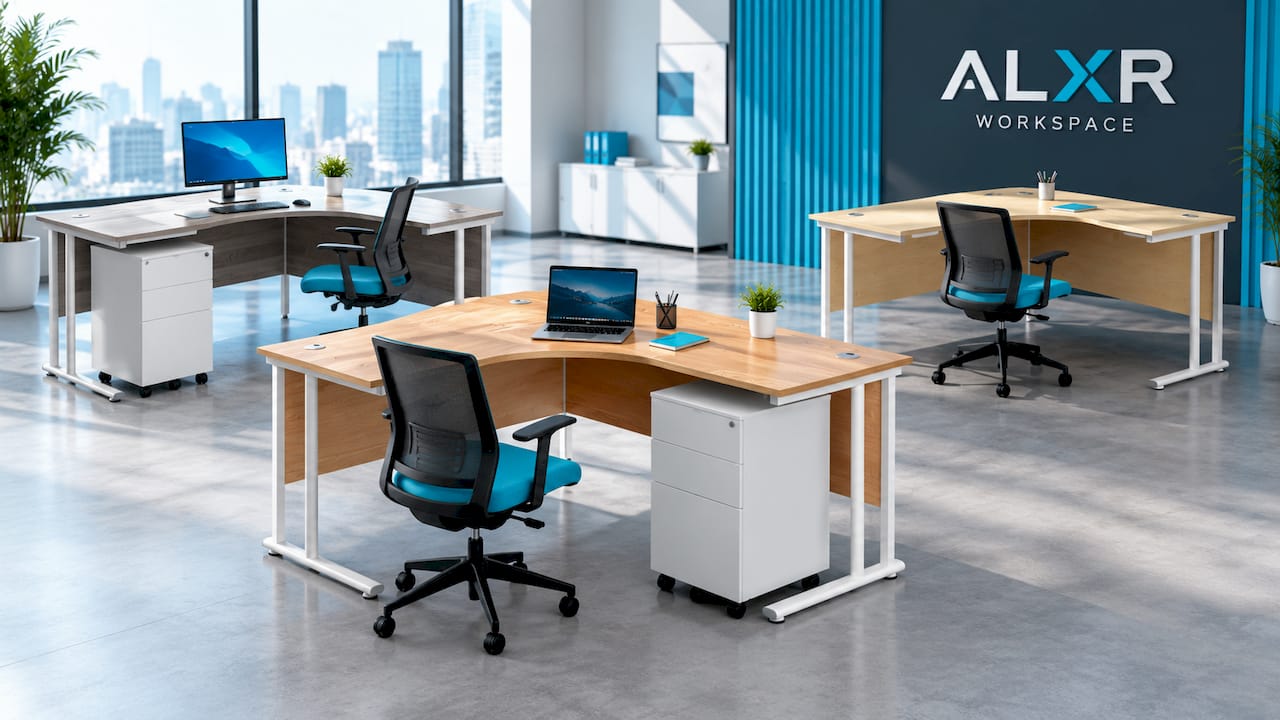
Rather than estimating knee clearance or desk depth from a spec sheet, installation teams can check compatibility on-site, so the tray, or the desk it pairs with, actually fits before it is fixed in place. That matters most for organisations fitting out multiple desks at once, where one mismatched measurement multiplied across a floor of workstations becomes an expensive mistake.
For readers whose desk itself is part of the problem, ALXR’s range includes options like the Twin Upright Right Hand Radial Desk with under-desk steel pedestal storage, available in a left-hand configuration too, and a standalone version without storage for those who want the radial layout without the drawers. Warranty support is offered with purchases, so a build issue does not become a problem to solve alone.

If you would rather have your setup measured properly than guess at sizing, request a quote through the ALXR workspace catalogue and start from an accurate fit rather than a rough estimate.
Sources
- Effects of keyboard tray geometry on upper body posture and comfort
- The Ultimate Guide to Buying the Best Keyboard Tray
- Keyboard Tray Guide — Do You Need One and Which Type Works Best | WorkDeskLab
- Keyboard Trays: Should You Install One? - ErgoDeskGuru